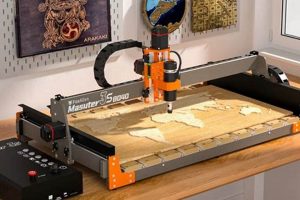
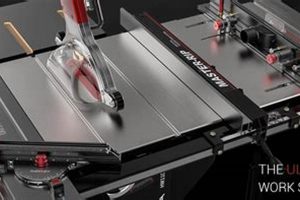
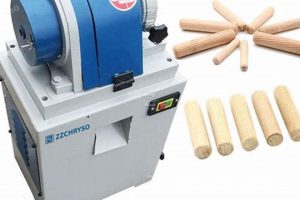
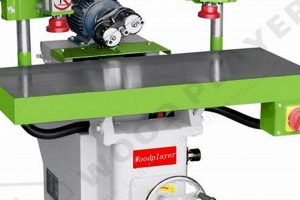
Automated cutting tools are computer-controlled devices designed for precise shaping and carving of wood. These units represent a specific category of automated woodworking equipment, offering a compact footprint suitable for smaller workshops, educational settings, or hobbyist use. Their functionality mirrors that of larger industrial counterparts, but their reduced size allows for greater accessibility and ease of integration into space-constrained environments.
The significance of these tools lies in their ability to produce intricate designs and repeatable parts with high accuracy, minimizing material waste and labor costs. This capability has revolutionized woodworking by allowing for the creation of complex joinery, detailed carvings, and customized designs that would be difficult or impossible to achieve manually. Historically, this level of precision was the domain of large-scale manufacturing, but advancements in technology have made it available to a wider range of users.
The following sections will delve into the key components, operational considerations, software integration, material compatibility, and maintenance practices associated with these increasingly popular tools. Further discussion will cover the selection criteria, safety protocols, and applications across various woodworking disciplines.
Essential Considerations for Operation
Successful utilization hinges on a clear understanding of its capabilities and limitations. The following tips outline crucial aspects to maximize performance and longevity.
Tip 1: Secure Firm Foundation: Prioritize a rigid and level work surface. Vibration dampening pads can mitigate resonance and improve cut accuracy. A stable base contributes directly to the precision of the final product.
Tip 2: Calibrated Workholding: Employ appropriate clamping or fixturing methods. Vacuum tables, t-track systems, or specialized jigs secure the material effectively, preventing movement during machining. The workpiece must remain stationary throughout the process.
Tip 3: Strategic Tool Selection: Choose cutting tools designed for wood and the specific task. End mills, v-bits, and specialty cutters optimize material removal and surface finish. Tool selection significantly affects efficiency and project quality.
Tip 4: Parameter Optimization: Carefully adjust feed rates, spindle speeds, and depth of cut to suit the material and tool. A conservative approach, especially when starting, prevents tool breakage and material damage. Fine-tuning parameters enhances the cut quality.
Tip 5: Regular Maintenance: Establish a routine for cleaning, lubrication, and inspection. Removing debris, lubricating moving parts, and checking for wear prolong the unit’s lifespan. Consistent maintenance ensures reliable operation.
Tip 6: Dust Extraction Integration: Connect a dust collection system to remove airborne particles effectively. This improves visibility, protects the machine’s components, and promotes a healthier work environment. Effective dust extraction is essential for both safety and performance.
Careful planning and adherence to these practices maximize accuracy, reduce downtime, and extend the functional life. Consistent execution of these points leads to improved outcomes and greater overall efficiency.
Following sections will discuss the software and design aspect with these points.
1. Footprint

The “footprint” of computer-controlled cutting devices is a critical factor in determining its suitability for a given workspace. This refers to the physical dimensions occupied by the machine, encompassing its length, width, and height. The footprint directly impacts placement options and the overall workflow within a workshop.
- Workshop Space Constraints
Limited square footage is a common constraint, particularly for hobbyists and small businesses. The machine must integrate efficiently without impeding movement or access to other equipment. A large footprint necessitates a dedicated area, potentially requiring reorganization or expansion of the existing workspace.
- Portability and Relocation
A smaller footprint facilitates easier relocation within a shop or to different job sites. Mobile bases or lighter construction materials can further enhance portability. Machines with a larger footprint are inherently less mobile, requiring specialized equipment for transport.
- Work Area Accessibility
While the footprint determines the space occupied, it also indirectly affects the reachable work area. Larger units may offer a bigger cutting area within their overall dimensions. Consideration must be given to the balance between overall size and the usable machining surface.
- Storage Considerations
When not in use, the storage requirements are dictated by its dimensions. Smaller units can be stored more easily when workspace is needed for other tasks. Larger units may require dedicated storage areas or remain permanently in place, impacting space utilization.
The assessment of a unit’s dimensions must be undertaken in conjunction with an evaluation of available space and operational requirements. Balancing these considerations ensures efficient integration and optimal use of the equipment within the constraints of the available environment.
2. Precision

Precision is a fundamental attribute of automated cutting tools. It dictates the accuracy and repeatability of cuts, engravings, and other machining operations. In woodworking, precision directly influences the quality, complexity, and consistency of finished products.
- Dimensional Accuracy
Dimensional accuracy refers to the degree to which the finished part matches the intended dimensions specified in the design. High dimensional accuracy ensures that components fit together properly, minimizing the need for manual adjustments. For example, creating precisely sized mortise and tenon joints for furniture construction relies on dimensional accuracy. Inaccurate cuts can lead to weak or unstable joints, compromising the structural integrity of the piece.
- Repeatability
Repeatability describes the machine’s ability to produce identical parts consistently over multiple iterations. This is crucial for mass production or creating multiple copies of a design. For instance, manufacturing identical cabinet doors requires high repeatability to ensure uniformity in size, shape, and detailing. Poor repeatability can result in variations between parts, leading to inconsistencies in the final assembled product.
- Surface Finish
Surface finish refers to the smoothness and quality of the cut surface. A fine surface finish reduces the need for sanding or other post-processing steps. Creating intricate carvings or decorative elements benefits from a smooth surface finish. A rough or uneven surface requires additional manual work to achieve the desired aesthetic result.
- Resolution
Resolution refers to the smallest incremental movement the machine can make. Higher resolution enables the creation of finer details and more complex geometries. Intricate inlays or detailed relief carvings demand high resolution. A low-resolution machine may not be able to accurately reproduce fine details, resulting in a loss of precision in the final product.
The level of precision achievable affects the complexity of designs and the efficiency of production processes. High precision allows for the creation of intricate, repeatable parts with minimal post-processing. This capability enhances the value and quality of woodworking projects.
3. Materials
The selection of appropriate materials directly influences the capabilities and limitations of automated woodworking devices. Material properties such as hardness, density, and grain structure determine machinability, cutting parameters, and ultimately, the final product’s quality. Compatibility between machine specifications and material characteristics is a crucial determinant of successful operation.
- Wood Density and Hardness
Varying wood densities and hardness levels necessitate adjustments to cutting speeds, feed rates, and tool selection. Softwoods like pine and cedar are generally easier to machine, requiring less power and generating less tool wear. Hardwoods such as oak and maple demand more robust tooling and precise control to prevent burning, splintering, or excessive vibration. The machine’s rigidity and spindle power must be sufficient to handle the intended material.
- Plywood and Engineered Wood Products
Plywood, MDF (Medium-Density Fiberboard), and other engineered wood products present unique challenges due to their layered construction and varying densities. Plywood’s alternating grain direction can cause splintering, requiring specialized cutters and techniques. MDF’s fine particulate composition produces significant dust, necessitating effective dust extraction systems. Careful consideration of the material’s internal structure is essential for achieving clean cuts and minimizing defects.
- Plastics and Composites
Certain plastics, such as acrylic and HDPE (High-Density Polyethylene), can be machined using these devices. However, appropriate cutting tools and techniques are necessary to prevent melting, chipping, or cracking. Composite materials, like carbon fiber reinforced polymers, may require specialized equipment and safety precautions due to the abrasive nature of the material and the potential release of hazardous particles. Material selection should align with the machine’s capabilities and safety standards.
- Material Thickness and Workholding
The maximum material thickness that can be processed is limited by the machine’s Z-axis travel and the length of the cutting tools. Securing the workpiece effectively is paramount to prevent movement or vibration during machining. Vacuum tables, clamps, and custom fixtures must be appropriately sized and configured for the material’s dimensions and shape. Inadequate workholding can compromise precision and safety.
Understanding these material-related factors is crucial for optimizing performance. Selecting materials that are compatible with the device’s capabilities, employing appropriate cutting parameters, and implementing effective workholding techniques are essential for achieving high-quality results and maximizing the lifespan of the equipment. Furthermore, adherence to safety protocols when machining plastics and composites is paramount.
4. Software
The operational capability of computer-controlled woodworking devices is inextricably linked to its associated software. Software serves as the bridge between design intent and physical execution, translating digital models into precise machine movements. Effective software integration is not merely a convenience but a fundamental requirement for achieving desired outcomes. This dependency extends across the entire workflow, encompassing design creation, toolpath generation, machine control, and process monitoring. Without appropriate software, these machines are rendered inoperable, highlighting the criticality of this connection.
Numerous software solutions cater to varying skill levels and project complexities. Computer-Aided Design (CAD) software facilitates the creation of digital models, ranging from simple geometric shapes to intricate 3D designs. These models serve as the blueprint for subsequent machining operations. Computer-Aided Manufacturing (CAM) software processes the CAD model, generating toolpaths that dictate the movement of the cutting tool. CAM software considers factors such as material properties, tool geometry, and desired surface finish to optimize the cutting process. Machine control software interprets the generated toolpaths and translates them into commands for the machine’s motors and control systems. This software also monitors machine performance and provides real-time feedback to the operator. For example, a user might employ CAD software like SketchUp to design a cabinet, CAM software like VCarve Pro to create toolpaths, and proprietary machine control software to execute the cutting process. The seamless interaction between these software components determines the accuracy and efficiency of the final product.
Software selection and proficiency represent a crucial aspect of automated woodworking. Inadequate software or a lack of operator training can result in inefficient toolpaths, inaccurate cuts, and potentially, damage to the machine or workpiece. Mastering the software workflow, from design creation to machine control, is essential for maximizing the capabilities of automated cutting equipment and achieving consistent, high-quality results. Continuous software updates and ongoing training are necessary to keep pace with technological advancements and optimize performance. Challenges include the steep learning curve associated with complex software packages and the need for compatibility between different software versions and machine control systems. Addressing these challenges is essential for realizing the full potential of computer-controlled woodworking.
5. Applications
The practical utility of automated woodworking devices is defined by the breadth of applications it supports. The integration of computer control allows for a degree of precision and repeatability unattainable through manual methods, expanding the scope of woodworking projects. The following facets highlight the most common applications, demonstrating the versatility of these machines.
- Sign Making and Engraving
Automated cutting tools excel in the creation of detailed signs, plaques, and engraved surfaces. Their precision allows for the production of intricate lettering, logos, and decorative elements. The ability to engrave various materials, including wood, acrylic, and metal, expands the application beyond traditional woodworking. Signage for businesses, personalized gifts, and decorative home accents are common examples of this application. The automation of the engraving process reduces labor costs and ensures consistent quality across multiple units.
- Furniture Components and Joinery
The precise cutting capabilities enable the creation of furniture components with complex joinery. This includes mortise and tenon joints, dovetail joints, and other intricate connections. Computer-controlled accuracy ensures tight-fitting joints and structural integrity. Mass production of identical furniture pieces is streamlined through automated processes. Custom furniture design, repair, and replication of antique furniture are further examples of this application. Automation reduces manual labor and enhances the precision of the woodworking process.
- Model Making and Prototyping
The creation of scale models and prototypes is significantly enhanced by automated cutting tools. Precise cuts and intricate detailing are achievable, enabling the accurate representation of complex designs. Architectural models, product prototypes, and educational aids benefit from the precision. Quick turnaround times and the ability to iterate on designs rapidly accelerate the prototyping process. This technology supports innovation and improves design accuracy across various disciplines.
- Artistic Carving and Sculpting
Automated cutting tools facilitate the creation of intricate artistic carvings and three-dimensional sculptures. Complex designs can be translated into physical forms with a level of detail difficult to achieve manually. Wood relief carvings, decorative panels, and sculptural elements are created with efficiency. Artists and craftspeople can explore new forms and automate repetitive tasks, freeing them to focus on creative aspects. These devices serve as a valuable tool for both traditional and contemporary woodworking techniques.
- Musical Instrument Making
Precise and repeatable cuts are essential in musical instrument creation. Automated devices can manufacture intricate parts of guitars, violins, and other instruments, leading to consistent sound quality and ease of assembly.
These varied applications showcase the adaptability of automated cutting tools in woodworking. From functional furniture components to artistic creations, these machines empower individuals and businesses to produce high-quality, intricate products with increased efficiency and precision. The integration of automated processes has revolutionized woodworking, enabling new levels of creativity and productivity.
6. Maintenance

The operational longevity and consistent performance of computer-controlled woodworking devices are intrinsically linked to regular maintenance protocols. Neglecting upkeep results in diminished precision, increased downtime, and accelerated component degradation, ultimately impacting productivity and financial returns. Maintenance is not merely an ancillary task but a fundamental aspect of ownership, directly influencing the equipment’s reliability and service life.
Preventive maintenance addresses potential issues before they manifest as critical failures. This includes routine tasks such as cleaning debris, lubricating moving parts, inspecting wiring, and calibrating axes. For example, sawdust accumulation on guide rails can impede smooth movement, leading to inaccurate cuts. Regular lubrication prevents friction and wear, extending the lifespan of bearings and lead screws. Neglecting these seemingly minor tasks can compound into significant problems, requiring costly repairs or replacements. Furthermore, software updates and firmware revisions ensure compatibility and optimize performance, addressing potential vulnerabilities or bugs that may arise over time. The implementation of a structured maintenance schedule minimizes unforeseen interruptions and preserves the machine’s accuracy.
Reactive maintenance addresses issues that arise unexpectedly. Effective troubleshooting and timely repairs are essential to minimize downtime. For instance, a broken cutting tool must be replaced promptly to resume operation. Similarly, electrical faults or motor malfunctions require immediate attention to prevent further damage. Diagnostic tools and readily available spare parts are crucial for efficient reactive maintenance. A proactive approach to maintenance, combining preventive measures with prompt responses to emerging issues, safeguards the investment in automated woodworking equipment and ensures its reliable operation for years to come. Proper maintenance can be challenging, especially if the knowledge to perform said maintenance isn’t available; there are training and documentation to overcome that difficulty.
7. Budget
Acquisition of automated woodworking equipment necessitates careful budgetary consideration. The initial investment represents a significant capital outlay, influenced by factors such as machine size, power, precision, and included software. However, the true budgetary impact extends beyond the purchase price, encompassing ongoing operational costs, maintenance expenses, and potential revenue generation. A comprehensive assessment of financial implications is crucial for informed decision-making. For example, a seemingly affordable entry-level unit may lack the necessary power or precision for certain projects, leading to increased material waste and reduced profitability. Conversely, an over-specified unit represents an unnecessary expense if its capabilities are underutilized. The correlation between initial investment and long-term return must be carefully evaluated.
Operational costs include electricity consumption, cutting tool replacement, and software subscription fees. Electricity usage is directly proportional to machine size and runtime, contributing to overhead expenses. Cutting tools, subject to wear and breakage, require periodic replacement. The frequency of replacement depends on material hardness, cutting parameters, and tool quality. Software licenses often involve recurring subscription fees, impacting ongoing expenses. Maintenance expenses encompass routine servicing, repairs, and component replacements. Proactive maintenance reduces the likelihood of costly repairs and extends the machine’s operational lifespan. Budgetary planning should allocate resources for both preventive and reactive maintenance measures. Neglecting maintenance can lead to catastrophic failures and significant financial losses.
The interplay between budget and equipment selection is a strategic decision. A higher initial investment in a more capable machine may yield greater long-term returns through increased efficiency, reduced material waste, and the ability to undertake higher-value projects. Conversely, a lower-cost option may suffice for simpler tasks, providing a more cost-effective solution for specific needs. The optimal budgetary approach balances initial capital expenditure with ongoing operational costs and potential revenue generation. A thorough understanding of these financial dynamics is essential for maximizing the return on investment and ensuring the long-term viability of automated woodworking operations.
Frequently Asked Questions about Small Woodworking CNC Machines
This section addresses common inquiries regarding the use, capabilities, and considerations surrounding compact computer-controlled woodworking devices. The information provided aims to offer clarity and guidance to individuals considering incorporating this technology into their woodworking practices.
Question 1: What are the primary advantages of utilizing a compact computer-controlled woodworking machine compared to traditional manual methods?
The principal advantages include increased precision, enhanced repeatability, and the ability to execute complex designs with greater efficiency. Automation minimizes human error and enables the creation of intricate geometries that would be difficult or impossible to achieve manually. Furthermore, computer control streamlines the production process, reducing labor costs and material waste.
Question 2: What types of woodworking projects are best suited for implementation on a small-scale automated woodworking device?
These machines are well-suited for projects requiring precision and repeatability, such as sign making, intricate carvings, furniture components with complex joinery, model making, and artistic sculpting. Smaller devices are best used for projects where size constraints are a factor.
Question 3: What is the typical learning curve associated with operating the software required to control automated woodworking equipment?
The learning curve varies depending on the complexity of the software and the user’s prior experience. Basic operation can be learned relatively quickly, but mastering advanced features and optimizing toolpaths requires dedicated training and practice. The learning curve will vary based on the software being used. More complex software will lead to a higher learning curve.
Question 4: What safety precautions should be observed when operating these units?
Essential safety precautions include wearing appropriate personal protective equipment (PPE), such as safety glasses and dust masks, ensuring proper ventilation, securing workpieces firmly, adhering to recommended cutting parameters, and never leaving the machine unattended during operation. Furthermore, regular maintenance and inspections are critical for preventing mechanical failures.
Question 5: What factors should be considered when selecting a cutting tool for a specific woodworking application?
Key factors to consider include material hardness, cutting speed, feed rate, desired surface finish, and the geometry of the cutting tool. Selecting the appropriate tool for the material and application maximizes efficiency, minimizes tool wear, and enhances the quality of the finished product.
Question 6: What are the typical maintenance requirements for maintaining the longevity and reliability?
Regular maintenance requirements include cleaning debris, lubricating moving parts, inspecting wiring, calibrating axes, and updating software. Following a structured maintenance schedule minimizes downtime and prevents component degradation. Consistent maintenance is paramount for preserving accuracy and ensuring consistent performance.
In summary, these FAQs provide a foundational understanding of key considerations related to automated woodworking devices. The integration of this technology can significantly enhance woodworking capabilities, provided that proper planning, training, and maintenance are prioritized.
The subsequent section will explore emerging trends and future advancements in the field of automated woodworking.
Conclusion
The preceding discussion elucidates the multifaceted nature of small woodworking cnc machines. From fundamental considerations of footprint and precision to the intricacies of software integration and material compatibility, these automated tools present both opportunities and challenges. Effective implementation demands a comprehensive understanding of operational considerations, maintenance requirements, and budgetary constraints. The diverse applications, ranging from sign making to furniture component fabrication, underscore the transformative potential of this technology within the woodworking sector.
As technology continues to evolve, ongoing education and adherence to best practices are essential for maximizing the benefits offered by small woodworking cnc machines. Continued investment in research and development will likely yield further advancements in precision, efficiency, and material versatility, solidifying its role as a valuable asset for both hobbyist and professional woodworkers.Staying informed about emerging trends and safety protocols is paramount for sustained success and responsible utilization of this increasingly prevalent tool.